Minecraft’s modding scene is the biggest in gaming, and that is exactly what makes it overwhelming. There are hundreds of thousands of mods, and most “best mods” lists just dump 30 names on you with no idea where to start.
This guide fixes that. It covers the essential mods every player should install first, the best content mods worth building a world around, and then points you to our in-depth guides for each category so you can go as deep as you want. Everything here is accurate for the latest 2026 version of Minecraft.
Quick answer: start with Sodium (or OptiFine) for FPS, JEI for recipe lookup, and Create for gameplay. Those three cover performance, convenience, and content. After that, pick category mods based on what you actually want to do, which is what the rest of this guide is for.
Best Minecraft Mods at a Glance
| Mod | What it does | Category |
|---|---|---|
| Sodium | Doubles or triples your FPS | Performance |
| JEI (Just Enough Items) | In-game recipe and item lookup | Utility |
| Create | Build automated machines and contraptions | Content |
| Alex’s Mobs | Adds 85+ new animals and creatures | Content |
| Xaero’s Minimap | Minimap and full world map | Navigation |
| Mekanism | Deep tech, machines, and automation | Tech |
| Farmer’s Delight | Cooking and expanded farming | Content |
The Essential Mods (Install These First)
No matter what kind of world you want, these are the mods that make everything else better.
Sodium – The FPS Fix
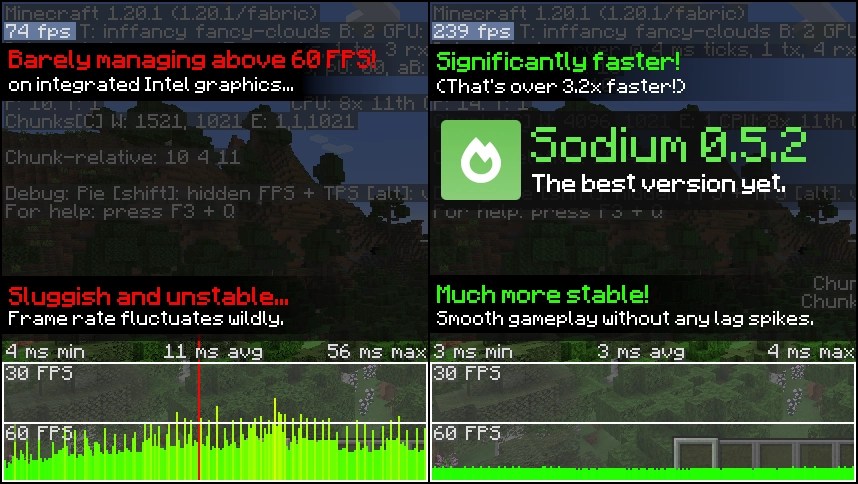
Sodium rewrites Minecraft’s rendering engine and can multiply your frame rate by two to five times with no visual downside. With well over 100 million downloads, it is the foundation of nearly every modern setup. If you are on a weaker PC, this is the single most important mod you can install. For a full performance stack, see our guide to the best optimization mods.
JEI (Just Enough Items) – Never Look Up a Recipe Again

Once you add content mods, you will have thousands of new items and no idea how to craft them. JEI adds a searchable in-game database of every recipe and item use. It is basically required the moment you install anything else, and it is one of the most downloaded mods ever for that reason.
Create – The Best Content Mod in the Game

Create lets you build genuinely impressive automated machines: conveyor belts, windmills, trains, and factory-style contraptions, all with a gorgeous animated art style. It is deep enough to carry an entire playthrough on its own, which is why it anchors so many modpacks.
Alex’s Mobs – Bring the World to Life

Vanilla Minecraft has a thin roster of animals. Alex’s Mobs adds more than 85 creatures with real behaviors and drops, from grizzly bears and orcas to cosmic horrors. It is the easiest way to make the overworld feel alive.
Best Minecraft Mods by Category
This is where you go deep. Pick the category that matches what you want, and each links to our full ranked guide.
- Performance and FPS: if the game runs badly, start here. Our best optimization mods guide covers Sodium, Lithium, and the rest of the stack, and the best mod launcher to run them.
- Shaders and visuals: for realistic lighting and water, see the best Minecraft shaders and the best realistic texture packs.
- Building: to expand your creative toolkit, check the best Minecraft mod for building and the best furniture mods for decorating.
- Horror: if you want the game to actually scare you, our best horror mods and dedicated stalker mods guides are the place to start.
- Combat and PvP: for fighting other players, see the best mods for PvP, and for ranged mayhem, the best gun mods.
- Playing with friends: setting up a modded server night? Start with the best mods to play with friends.
- Creatures and collecting: for a Pokemon-style adventure, see the best Minecraft Pokemon mod.
- Quality of life: for the small tweaks that make everything smoother, our quality of life mods guide has the essentials.
Prefer a Ready-Made Pack? Use a Modpack
If picking individual mods feels like too much, a modpack bundles dozens or hundreds of compatible mods into one install. It is the fastest way to get a full modded experience without fighting version conflicts.
Our guide to the best Minecraft modpacks ranks the top all-in-one packs, and if you want a specific style, the best RPG modpacks covers dragons, quests, and adventure.
How to Install Minecraft Mods
The easy way handles versions and mod loaders for you:
- Download the free CurseForge app or Modrinth app.
- Create a new modded instance for the version you want (1.20.1 has the widest mod selection).
- Pick your mod loader: Fabric (lightweight, best for performance mods) or Forge / NeoForge (best for big content mods).
- Search each mod by name inside the launcher and install it. Most Fabric mods also need Fabric API.
- Launch from the modded instance, not the base launcher.
Only ever download mods from CurseForge or Modrinth. Never use random websites or Discord links.
Frequently Asked Questions
Start with Sodium for FPS, JEI for recipe lookup, and Create for content. Those three cover performance, convenience, and gameplay, and everything else builds on them.
Use Fabric if you mainly want performance and lightweight mods, and Forge or NeoForge for big content mods like Create and Mekanism. Many mods now support both, but you cannot mix loaders in one instance, so pick per world.
1.20.1 by a wide margin. Nearly every major mod either launched there or has its most stable version on it, so it is the best version to build a modded setup around.
Yes, if you use the official CurseForge or Modrinth pages. Do not download mods from random sites, ad-heavy mirrors, or unknown Discord links.
Many do, as long as everyone runs the same mods and version. For a smooth server setup, see our best mods to play with friends guide.
As many as your PC can handle. Pair heavy content mods with performance mods like Sodium and Lithium, and use a modpack if you want a big, pre-tested list without conflicts.
Minecraft mods can turn the same game into a survival horror, a factory sim, a Pokemon adventure, or a beautiful cinematic build tool. Start with the essentials above, then pick the category that excites you and go deep with the guides linked throughout. If you would rather skip the setup, grab a modpack and jump straight in.