


Dying and losing everything is bad enough, but not knowing where you died is worse. The good news: Minecraft keeps track of your last death spot, and there are a few reliable ways to get back to it and grab your loot.
This guide covers every working method for finding and returning to your death point, on both Java and Bedrock, and which one to use depending on whether you have cheats on. Everything here was tested on Java 26.3 and Bedrock 26.52.
Quick answer: in Java Edition with cheats on, run /data get entity @s LastDeathLocation to get your exact death coordinates, then teleport with /tp @s x y z. Without cheats, or on Bedrock, craft a Recovery Compass (1 compass + 8 echo shards), which points straight to where you died.
Ways to Get Back to Your Death Point at a Glance
| Method | Edition | Needs cheats? | What it does |
|---|---|---|---|
| LastDeathLocation command | Java | Yes | Gives exact death coordinates to teleport to |
| Recovery Compass | Java and Bedrock | No | Points you to your death block |
| Teleport to your items | Bedrock | Yes | Jumps to nearby dropped items |
First: Act Fast, Your Items Are on a Timer
Before anything else, know this: dropped items despawn after 5 minutes while their chunk is loaded, and your XP resets to 0 and drops as orbs worth at most 100 points. So the clock is ticking the second you respawn.
Two things worth setting up before you explore:
- If you hate losing items entirely, turn on the keep_inventory gamerule (keepinventory on Bedrock). Here is how to keep your inventory on death.
- Note that items lost to lava or the void are destroyed, not dropped, so no method will recover those.
Method 1: Get Your Death Coordinates With a Command (Java)
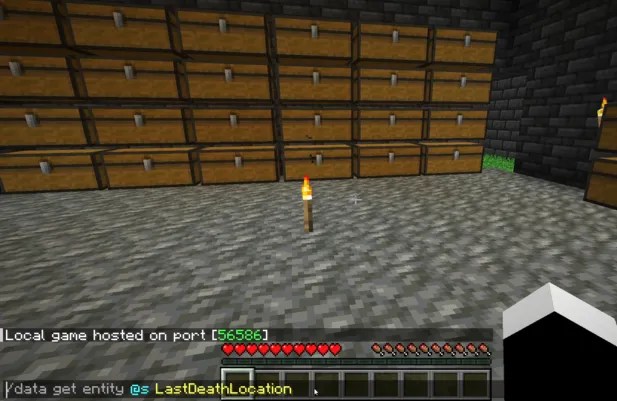
In Java Edition, the game stores your exact death spot, and a single command reads it back. This is the most precise method, but it needs cheats enabled.
- Enable cheats. Open World Options from the Pause Menu and switch Allow Commands to ON (before Java 26.3: Open to LAN, then Allow Cheats: ON), or start a world with cheats on.
- Get your death location. Open the chat and run:
/data get entity @s LastDeathLocation - It returns the dimension and exact coordinates, for example
dimension: "minecraft:overworld", pos: [I; 100, 64, -200].
The command is case-sensitive, so type LastDeathLocation exactly as shown.
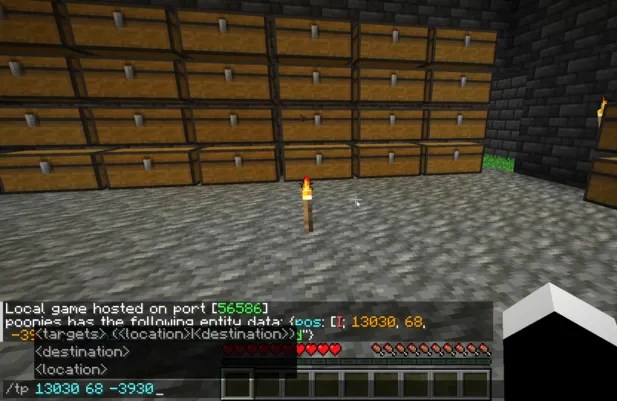
Now teleport to those coordinates with: /tp @s x y z (replace x y z with the numbers from the command).
Watch the dimension. If the command says you died in the_nether or the_end, you have to be in that dimension for the coordinates to make sense. Head there first, then teleport.
Method 2: Craft a Recovery Compass (Java and Bedrock)

The Recovery Compass is the only built-in item made for this, and it works with no cheats on both editions. It does not teleport you, but its needle points straight to your last death spot.
To craft it:
- Place 1 Compass in the center of the crafting grid.
- Surround it with 8 Echo Shards, found only in loot chests inside Ancient Cities in the Deep Dark.
Two things to know so it does not confuse you:
- It only points correctly when you are in the same dimension you died in. In any other dimension, the needle just spins randomly.
- It points to the block where you died, not to your scattered items, so still hurry before the 5-minute despawn.
Because echo shards come from Ancient Cities, this is a mid-to-late game tool. If you are not there yet, use one of the command methods instead.
Method 3: Teleport to Your Items (Bedrock)

Bedrock Edition does not have the LastDeathLocation command, so there is no way to read your death coordinates directly. Your best no-command option is the Recovery Compass above. But if you have cheats on and respawned somewhere near your death, you can jump straight to your dropped items:
- Run:
/tp @s @e[type=item] - This teleports you to the nearest dropped item entity. If your death pile is the closest loaded loot, you land right on it.
This only works while your items still exist (that 5-minute window) and while the chunks are loaded, so it is best used right after respawning close by. For anything further out, the Recovery Compass is more reliable.
A good habit on Bedrock: turn on Show Coordinates in your world settings before you explore, so you always know where you are and can navigate back manually if all else fails.
Frequently Asked Questions
In Java, run /data get entity @s LastDeathLocation to see the exact dimension and coordinates. On both editions, a Recovery Compass points to your death spot. Bedrock has no command to read death coordinates.
There is no single “teleport to death” command. In Java, you first get the coordinates with/data get entity @s LastDeathLocation, then teleport with /tp @s x y z.
Put 1 Compass in the middle of the crafting grid and surround it with 8 Echo Shards. Echo Shards only come from chests in Ancient Cities in the Deep Dark.
It only points to your death spot when you are in the same dimension where you died. If you died in the Nether and you are in the Overworld, it spins randomly until you go back.
Dropped items despawn after about 5 minutes while their chunk is loaded. Your XP level resets to 0 and drops as orbs worth at most 100 points. Items that fell in lava or the void are destroyed and cannot be recovered.
Yes, with a Recovery Compass. Without it, Bedrock has no built-in way to find your death coordinates, so turning on Show Coordinates ahead of time is your best backup.
Losing your stuff does not have to mean losing it for good. If you have cheats, the Java LastDeathLocation command is the fastest and most exact fix. If not, a Recovery Compass will guide you back to either edition. Just remember the 5-minute clock. For getting around your world in general, see our guides on how to teleport back to your spawn point and how to teleport to a village.
Related teleport guides: teleport from the Nether to the Overworld.



