Increasing tick speed is how you make crops shoot up in seconds, speed through a slow night, or fast-forward a farm to test it. But “tick speed” actually means two different things in Minecraft, and mixing them up is why people get confused. This guide covers both, so you get exactly the speed-up you are after.
There is random tick speed (how fast individual blocks like crops, fire, and ice update) and the game tick rate (how fast the entire game runs). This guide explains the difference, the exact commands, and the warnings that matter. Everything here is confirmed in the current 2026 version of Minecraft (26.2).
Quick answer: enable cheats, open chat (press T), and type /gamerule randomTickSpeed 100 to make crops and plants grow far faster. To speed up the whole game (mobs, redstone, day-night), use /tick rate 100 on Java Edition instead. The Java default is randomTickSpeed 3 and tick rate 20.
Tick Speed at a Glance
| Setting | Command | Default | Speeds up |
|---|---|---|---|
| Random tick speed | /gamerule randomTickSpeed [value] | 3 (Java), 1 (Bedrock) | Crops, plants, fire, ice, leaves |
| Game tick rate (Java) | /tick rate [value] | 20 | Everything (mobs, redstone, time) |
First: Turn On Cheats

Both commands need cheats. In a single-player world, pause, choose Open to LAN, set Allow Cheats: ON, and start the LAN world (or enable cheats when creating the world). On a server, you need operator status. Without cheats, the commands simply will not run.
Method 1: Random Tick Speed (Faster Crops and Plants)

This is what most people mean by “tick speed.” It controls how often blocks that rely on random ticks update:
- Press T to open chat.
- Type /gamerule randomTickSpeed 100 (use any number you like).
- Press Enter.
The higher the number, the faster those blocks change. At 100, plant a crop and you can watch it grow almost instantly. The default is 3 on Java (1 on Bedrock), and setting it to 0 freezes all random-tick growth entirely.
What random tick speed affects: crops, saplings, and other plant growth; fire spreading; ice and snow melting; leaves decaying; copper oxidizing; and similar slow, “random” block changes. It does not speed up mobs, redstone, or the day-night cycle.
Under the hood, Minecraft divides every chunk into 16x16x16 subchunks (4,096 blocks each), and each game tick it random-ticks that many blocks per subchunk. So going from 3 to 100 is a big jump in activity, which is exactly why the next part matters.
Method 2: Game Tick Rate (Speed Up the Whole Game)
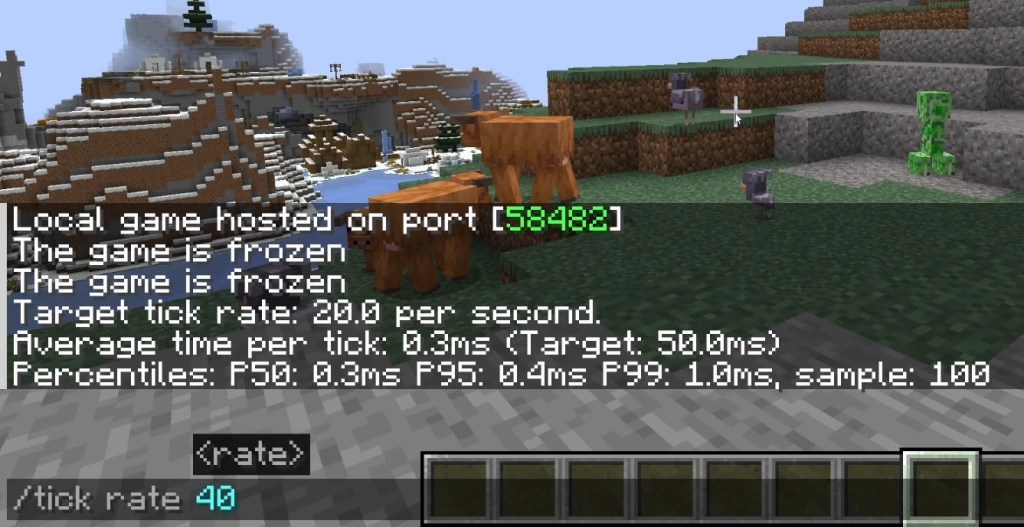
On Java Edition, the game normally runs at 20 ticks per second (one tick every 0.05 seconds). The /tick command lets you change that, speeding up or slowing down everything at once:
- Open chat and type /tick rate 100 to run the game at 5x speed.
- Press Enter. Mobs, furnaces, redstone, and the day-night cycle all move faster.
Use /tick rate 20 to return to normal. The tick command also has handy extras: /tick freeze pauses game updates, /tick step advances a set number of ticks, and /tick sprint blasts through a batch of ticks as fast as your PC can manage. This is a Java-only feature; Bedrock does not have the /tick command.
The Warnings (Read Before You Crank It to 10,000)
More ticks means more work for your computer, so both settings can wreck performance if you overdo it:
- High randomTickSpeed (think 10,000+) can cause severe lag, unstable mob behavior, and uncontrollable fire spread. For fast farming without melting your world, 10 to 40 is the practical sweet spot; 100 is fine for a quick demo.
- High tick rate speeds up everything, so a weak PC will simply fail to keep up and stutter.
- Random ticks only happen in loaded chunks, so cranking the number does nothing to areas that are not loaded around you.
Change it back whenever you want. randomTickSpeed persists with your save, so remember to lower it after a big farming session.
Frequently Asked Questions
Enable cheats, open chat with T, and type /gamerule randomTickSpeed 100 to speed up crops and plants. To speed up the entire game on Java, use /tick rate 100 instead. The defaults are randomTickSpeed 3 and tick rate 20.
Random tick speed defaults to 3 on Java Edition and 1 on Bedrock. The game tick rate is 20 ticks per second, which is one tick every 0.05 seconds.
Yes. Raising randomTickSpeed makes crops, saplings, and other plants grow much faster because it increases how often those blocks get random ticks. It does not speed up mobs or redstone.
randomTickSpeed only affects “random” block events like plant growth and fire. /tick rate (Java only) changes the whole game’s speed, including mobs, redstone, furnaces, and the day-night cycle.
Yes, for random tick speed: use /gamerule randomtickspeed with a value. Bedrock does not have the /tick command, so you cannot change the overall game tick rate there.
For faster farming, 10 to 40 is a good, stable range. Very high values like 10,000+ can cause severe lag, buggy mobs, and runaway fire, so avoid them unless you are just testing.
Once you know that “tick speed” splits into random ticks (plants) and the game tick rate (everything), picking the right command is easy. Bump randomTickSpeed for instant crop growth, use /tick rate to fast-forward the whole world, and dial both back down when you are done. To put that fast growth to work, see our guide to the best Minecraft farms.